
AI Overview
A commercial garage door security system combines strong door hardware with electronic access control, video monitoring, activity records, alerts, and planned access schedules.
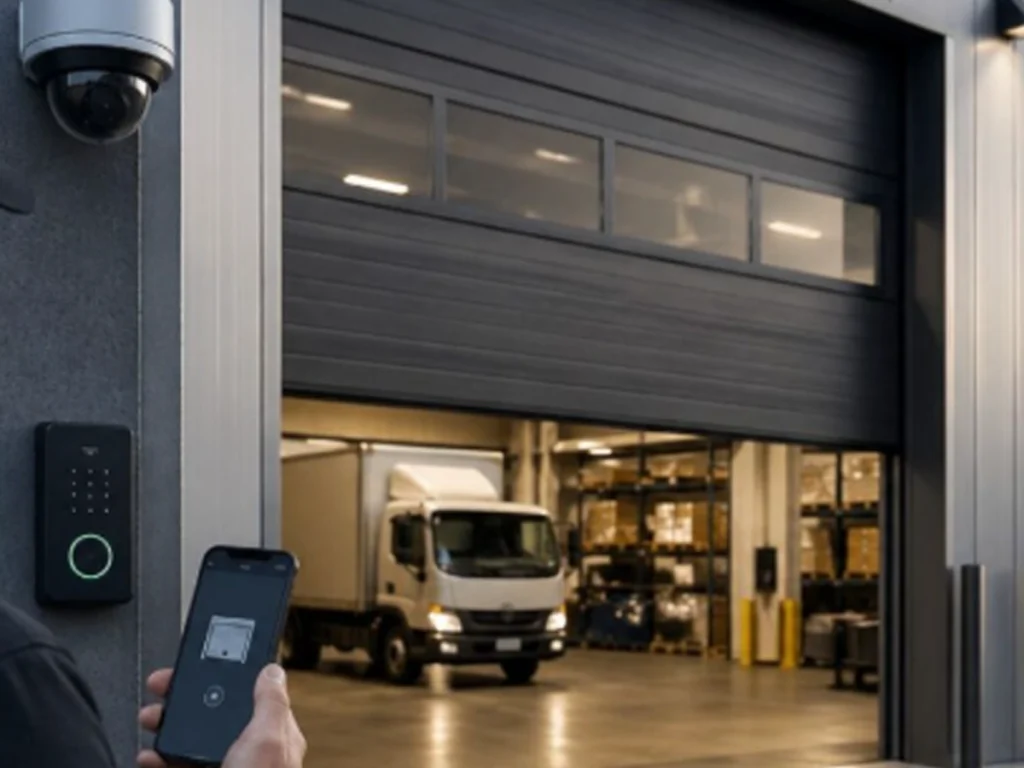
For mixed use properties, the system should give different permissions to owners, managers, employees, tenants, vendors, and emergency personnel. It should also record important access events without creating needless steps for approved users.
However, smart technology cannot correct a weak or damaged door. Therefore, development should begin with a full assessment of the door, operator, locks, sensors, tracks, springs, cables, power supply, network, and daily access needs.
The strongest system connects physical protection with useful information. It helps decision makers know who entered, when the door moved, whether it closed, and what action may be needed.
A Surprising Fact About Smart Commercial Access
One commercial garage door can now perform several security tasks at once.
It can confirm a user credential, open during an approved time, record the event, link it to video, and alert a manager if the door remains open.
That level of control was once limited to large or highly secure facilities. However, modern access products now make many of these functions practical for mixed use commercial properties.
The Cybersecurity and Infrastructure Security Agency explains that facility access control should cover the full process, from initial entry through authentication into protected areas. This guidance shows that security involves more than placing a lock on one opening.
Therefore, developing a commercial garage door security system requires careful planning. Each device must support the door, property layout, users, risks, and business operations.
A warehouse tenant may need early delivery access. Meanwhile, retail employees may need entry only during business hours.
A property manager may need full oversight. However, an outside vendor may need temporary permission for one service visit.
Consequently, one access rule cannot serve every user safely. The system should provide the correct level of access to each approved person.
- Smart security should manage both physical movement and digital permission.
- Every feature should solve a clear security or operating need.
Why Does a Commercial Garage Door Need Smart Security?
Commercial garage doors often protect vehicles, tools, inventory, equipment, records, and work areas. They may also serve as employee or delivery entry points.
However, a standard remote control provides limited information. A manager may not know who used it, when the door opened, or whether it closed afterward.
Traditional keys create similar concerns. Keys can be copied, shared, misplaced, or kept by former workers.
Smart access improves visibility by connecting each approved user with a separate credential. Therefore, managers can grant or remove access without replacing every lock.
A complete system may also send alerts when unusual events occur. For example, it may report a door that remains open beyond a set period.
It may also flag access outside an approved schedule. As a result, managers can investigate activity sooner.
Everlast Garage Doors describes commercial doors as important parts of daily workflow, property security, and reliable access for Franklin businesses. The company also provides installation, repair, maintenance, replacement, and emergency garage door services.
- Smart security gives managers more control than shared keys or remotes.
- It can also connect garage door activity with broader property security plans.
What Should the Development Process Achieve?
The development process should create a system that is secure, practical, reliable, and easy to manage.
Security is important, but an overly complex system can slow daily work. Therefore, decision makers must balance control with efficient access.
The system should answer several basic questions.
Who needs access?
Which door should each person use?
What times should access be allowed?
What should happen when a door stays open?
Who should receive alerts?
How long should activity records remain available?
The answers form the basis of the design. Without them, a property may buy advanced devices that do not match actual operations.
For mixed use buildings, planning should also consider shared and private areas. A tenant may access one garage bay but not another.
Similarly, a delivery driver may enter a loading area without gaining access to tenant storage or office space.
- Development should begin with users, risks, routines, and property zones.
- Technology should be selected only after those needs are clear.
How Does a Full Security Assessment Begin?
A full assessment starts with the commercial garage door itself.
A technician should inspect the panels, guides, tracks, rollers, hinges, springs, cables, locks, operator, controls, and safety devices.
If these parts are damaged, the door may not close or lock correctly. Therefore, adding smart controls without mechanical repairs may create false confidence.
The assessment should also review how people currently use the opening. Decision makers should note busy periods, delivery times, tenant access, staff changes, and after hours activity.
Next, the property team should identify valuable areas near the door. These may include storage rooms, parked vehicles, workshops, stock areas, or internal hallways.
The assessment should also consider power and network access. Smart controls may depend on stable electricity, communication wiring, wireless service, or backup power.
Finally, the property should define likely threats. These may include stolen credentials, forced entry, doors left open, tailgating, internal misuse, or accidental access.
- Mechanical condition should be checked before smart devices are selected.
- Security risks should be based on the actual property rather than broad assumptions.
How Should Access Permissions Be Structured?
The selected direction for this article places strong value on different access permissions for staff, tenants, vendors, and managers.
This structure is often called role based access. Each person receives permission according to responsibilities rather than receiving unlimited control.
For example, property owners may need access to all commercial garage doors.
Facility managers may need full daily control, alert settings, reports, and temporary credential tools.
Employees may need access only to their assigned work area during scheduled shifts.
Tenants may receive access to their leased garage space but not maintenance or storage zones.
Vendors may receive temporary entry for one date, one door, and one planned time.
CISA facility access guidance stresses the importance of managing employees, visitors, screening, authentication, and entry into protected spaces. Although the guidance was developed for federal facilities, its planning principles can help commercial decision makers consider access as a complete process.
- Permissions should follow each user role and approved property area.
- Temporary users should not receive permanent or building wide access.
Which Credentials Can Control the Door?
A smart commercial garage door security system may support several credential types.
Common options include mobile credentials, access cards, key fobs, keypads, personal codes, and connected remote controls.
Mobile credentials can be convenient because many users already carry phones. Managers may also revoke access without recovering a physical card.
Cards and fobs can work well for employees who enter many times each day. However, every card should be linked to a named user.
Keypads may support visitors, vendors, or backup access. Yet shared codes can reduce accountability when many people know the same number.
Therefore, each user should receive an individual code when the system allows it.
The correct credential depends on the work environment. Workers wearing gloves may prefer cards or fobs, while office tenants may prefer mobile access.
- Credentials should match the user, property conditions, and daily routine.
- Shared codes should be limited because they weaken clear access records.
Why Is Mobile Control Valuable?
Mobile control allows an approved manager to review or control access through a connected device.
Depending on the selected system, a manager may check door status, receive alerts, open or close a door, and manage user permissions.
This feature can help when a tenant reports that a door was left open. Instead of driving to the property immediately, the manager can first review system information.
However, remote control should include safeguards. Strong passwords, protected accounts, current software, and limited administrator permissions are important.
The system should also prevent every user from gaining full remote control. Most employees or vendors need only basic entry rights.
Everlast Garage Doors discusses smart access as a useful way to monitor garage door activity and support remote control. Its published content also emphasizes matching smart operators to the door and checking balance, sensors, travel limits, and connected parts.
- Mobile control can help managers respond without being on site.
- Administrator rights should remain limited to trusted decision makers.
How Do Real Time Alerts Improve Response?
Real time alerts inform assigned users when a defined event occurs.
A system may send an alert when the door opens, closes, fails to close, stays open too long, or receives a forced entry signal.
However, sending an alert for every normal event may overwhelm managers. Therefore, alert rules should focus on events that require review.
For example, a facility manager may not need a message every time employees enter during the day.
Yet the manager may need immediate notice when the door opens after midnight.
The system may also send a warning when repeated failed credential attempts occur.
A door position sensor can help confirm whether the opening is fully closed. This detail matters because an operator command does not always prove the door completed its movement.
- Alerts should focus attention on events that may require action.
- Door position should be confirmed through sensors rather than commands alone.
Why Should Video Be Linked to Access Events?
Video provides visual context for garage door activity.
An access record may show that a staff credential opened the door at a certain time. However, video can show whether one vehicle or several vehicles entered.
It may also show whether another person followed the approved user through the opening.
When video and access events share matching time information, managers can review incidents more quickly.
For mixed use properties, camera placement should cover the door approach, credential point, threshold, and nearby traffic area.
However, cameras should support a defined security purpose. Property owners should also follow applicable privacy, notice, employment, and data retention requirements.
Video quality matters as well. Poor lighting, blocked views, or incorrect angles may limit its usefulness.
- Linked video can help verify what happened during an access event.
- Camera placement and retention rules should support clear business needs.
How Can the System Reduce Tailgating?
Tailgating occurs when an unauthorized person or vehicle follows an approved user through an open access point.
Commercial garage doors can be vulnerable because the opening may remain clear long enough for another vehicle to enter.
Video monitoring can help identify this event. In addition, vehicle detection, timed closing, intercom confirmation, and staff procedures may reduce the risk.
However, the door must not close in a way that creates a hazard. Safety sensors and monitored protection devices should remain part of the design.
The best solution depends on door speed, traffic flow, vehicle size, visibility, and property layout.
For busy properties, a separate entry and exit process may provide better control than one shared opening.
- Access approval should apply to one planned user or vehicle.
- Closing controls must balance security with safe door movement.
Why Are Scheduled Access Rules Important?
Scheduled rules allow credentials to work only during approved periods.
For example, retail employees may enter from early morning until closing time.
A cleaning contractor may access the property during a shorter evening window.
A delivery vendor may receive permission during planned receiving hours.
Meanwhile, owners and facility managers may retain broader emergency access.
These rules reduce the need to distribute permanent keys. They can also limit access when a worker changes roles or completes a contract.
Automatic schedules may also lock specific functions after business hours. However, managers should plan exceptions for emergencies, overtime, and special events.
- Scheduled permissions can reduce unnecessary after hours access.
- Managers should create a clear process for temporary schedule changes.
What Should Happen When a Door Stays Open?
A door left open can expose equipment, inventory, vehicles, and interior building areas.
Therefore, the system should recognize when the opening remains unsecured beyond a normal operating period.
The first response may be a local warning or mobile alert.
Next, the system may notify a manager, security employee, or property owner.
Some systems may allow remote closing. However, the manager should confirm that the opening is clear before sending a closing command.
Video verification can support that decision.
The system should also record the event, response, and final door status. This record may help managers improve staff training or change closing schedules.
- Open door alerts should reach someone with authority to respond.
- Remote closing should occur only when safe conditions can be confirmed.
How Should Automatic Locking Work?
Automatic locking adds another physical layer after the door closes.
However, the lock, operator, and door position must work together. A lock should not engage before the door reaches the proper closed position.
Likewise, the operator should not attempt to move the door while a physical lock remains engaged.
This coordination requires compatible controls and correct installation.
Decision makers should also consider how the door will open during power loss, fire response, equipment failure, or an emergency.
Automatic locking should support the property security plan without blocking required emergency procedures.
- Smart locks must coordinate with door position and operator movement.
- Emergency access and power loss procedures should be planned before installation.
Why Does Mechanical Door Condition Still Matter?
Smart controls cannot make damaged hardware dependable.
A worn roller can cause rough travel. A bent track can stop movement. A weak spring can overload the operator.
Likewise, damaged panels may prevent the door from closing evenly. Loose cables or brackets may create a serious operating concern.
DASMA provides maintenance and safety resources for garage doors, operators, and access systems. Its materials stress proper inspection, operation, maintenance, and testing.
Therefore, a commercial security project should include mechanical inspection and needed repairs.
Everlast Garage Doors states that its commercial services include installation, repair, maintenance, custom designs, replacement, and emergency support.
- A secure system requires a door that closes and operates correctly.
- Mechanical maintenance should continue after smart features are installed.
What Safety Devices Should Be Included?
Commercial door safety needs depend on the operator, door type, property layout, and method of use.
Possible devices include photoelectric sensors, monitored edges, vehicle detectors, warning lights, audible signals, and emergency controls.
The goal is to detect people, vehicles, or objects in the door path.
Safety devices should remain active even when the system receives a remote or scheduled command.
Managers should never disable protection devices merely to speed access.
Regular testing is also important. A device that appears connected may not respond correctly if it is damaged, dirty, blocked, or misaligned.
- Every automatic movement should include suitable monitored protection.
- Safety devices should be tested under planned maintenance procedures.
How Should Power Failure Be Managed?
A smart commercial garage door security system depends on power for several functions.
The operator, controller, reader, network equipment, locks, cameras, and alert tools may all need electricity.
Therefore, development should consider what happens during an outage.
Some properties may need battery backup for the operator or access controller.
Others may need a generator, protected network equipment, or a defined manual release process.
However, manual release controls must remain secure from unauthorized use.
The property team should document which features continue during an outage and how staff should respond.
- Backup power needs should be based on security and operating priorities.
- Manual procedures should restore access without creating an easy security weakness.
How Should Network Security Be Addressed?
Connected access systems combine physical security with information technology.
Therefore, account protection, software updates, user permissions, and network design require attention.
Default passwords should be changed during setup.
Administrator accounts should be limited and reviewed regularly.
Former employees and vendors should lose access promptly.
System software and connected applications should receive supported updates.
When possible, access devices should use a protected business network rather than an open guest connection.
Activity records should also be protected from unauthorized changes.
- Physical access security now depends partly on secure digital management.
- Credentials and administrator accounts should be reviewed throughout the system life.
What Records Should the System Keep?
Useful access records may include the user, credential, door, date, time, result, and related alert.
For example, the system may record that a tenant credential opened the east garage door during an approved period.
It may also record denied attempts, remote commands, forced entry signals, and doors left open.
These records can help investigate incidents and resolve access questions.
However, collecting unlimited data without a clear purpose may create management and privacy concerns.
Decision makers should define how long records are needed, who may review them, and how they will be protected.
- Records should provide enough detail to support security review.
- Retention periods should follow business, legal, and privacy needs.
How Does a Mixed Use Property Apply the System?
Consider an illustrative mixed use property with retail units, offices, storage rooms, tenant parking, and a shared delivery area.
This example does not describe a verified Everlast Garage Doors customer because no specific customer record was provided.
The property owner receives full administrative oversight.
The facility manager receives alerts, door status, access reports, and temporary credential controls.
Retail staff receive access during store operating periods.
Office tenants receive access to the parking area and their assigned building entrance.
Delivery companies receive temporary access to the loading area during approved windows.
Maintenance vendors receive one time credentials for scheduled work.
Video records are connected with major garage door access events.
After business hours, the system alerts the manager when a door opens or remains unsecured.
Automatic locking engages only after sensors confirm that the door has fully closed.
- Each user receives only the access needed for an approved role.
- Alerts, video, schedules, and locks operate as connected security layers.
What Should Property Owners Prioritize?
Property owners should begin with risk, value, and long term control.
They need to understand which areas require the strongest protection and which users need regular access.
Owners should also consider future tenants, property expansion, and changing security needs.
A flexible system can make it easier to add credentials, cameras, doors, or access zones later.
However, the owner should avoid paying for features that serve no clear purpose.
The strongest investment is a system that supports the property for years without becoming difficult to manage.
- Owners should connect security spending with actual property risks.
- The selected platform should support reasonable future growth.
What Should Facility Managers Prioritize?
Facility managers handle the daily relationship between security, maintenance, and access.
They need simple tools for adding users, changing schedules, checking doors, and reviewing alerts.
They also need reliable maintenance records for every door and operator.
A useful dashboard should show which door needs attention without forcing the manager to search through unnecessary information.
Facility managers should also create written response procedures.
For example, the procedure should explain who checks an open door alert and what happens when a credential is lost.
- Daily controls should be easy for trained managers to use.
- Every important alert should connect to a clear response procedure.
What Should Security Managers Prioritize?
Security managers often focus on detection, verification, response, and documentation.
They should help define alert levels and decide which events need immediate attention.
A forced entry alert may require a different response from a door that remains open during receiving hours.
Security managers should also confirm that video, access records, and door times remain synchronized.
They may review patterns such as repeated denied entry, unusual after hours access, or doors that remain open too often.
- Alerts should be ranked according to risk and required response.
- Access and video information should provide a clear event timeline.
What Should Business Owners Prioritize?
Business owners must protect people, tools, vehicles, inventory, and business continuity.
Therefore, their security choices should support daily work rather than create constant delays.
Owners should identify which employees need access and which doors protect the most valuable operations.
They should also plan for staff changes. Removing a digital credential should be quicker than collecting every shared key or remote.
Business owners may also benefit from reports showing when opening and closing activity occurred.
- Access rules should protect assets without blocking normal work.
- Credential removal should be simple when employees or vendors leave.
How Should Installation Be Planned?
Installation should follow a written design rather than a collection of separate product choices.
The plan should identify doors, readers, cameras, sensors, locks, controllers, power supplies, network points, and user groups.
The door technician should coordinate with security, electrical, network, and property teams when needed.
Mechanical repairs should be completed before final system testing.
Next, each credential type and schedule should be tested.
Alerts should be sent to the correct people.
Video events should match access records.
Finally, the door should complete safe opening, closing, locking, and emergency procedures.
- Installation should connect mechanical, electrical, digital, and operational work.
- Final testing should cover normal use, denied access, alerts, and power loss.
How Should Employees and Tenants Be Trained?
Even a strong system can fail when users do not understand it.
Training should explain how to present credentials, report a lost device, handle denied entry, and respond to a door that remains open.
Users should also know that sharing credentials weakens accountability.
Managers need deeper training on permissions, schedules, alerts, reports, and temporary access.
Training should be brief, clear, and specific to each role.
Written instructions can support new employees, tenants, and vendors later.
- Every user should understand safe and approved access steps.
- Administrators need added training for control and reporting tools.
How Should the System Be Maintained?
Maintenance should cover both the commercial door and its connected security technology.
Door service may include inspection of panels, tracks, rollers, hinges, cables, springs, locks, operators, and safety devices.
Security service may include checking readers, sensors, cameras, controllers, backup batteries, alerts, user lists, and software.
DASMA recommends regular inspection, testing, and maintenance of garage door and opener systems.
Managers should also review access rights on a planned schedule.
Unused credentials should be removed.
Temporary permissions should expire.
Contact lists for alerts should remain current.
- Mechanical and digital maintenance should follow one coordinated plan.
- User permissions should be reviewed as carefully as door hardware.
What Mistakes Should Decision Makers Avoid?
The first mistake is adding smart devices to a damaged door.
The second is giving every user the same access.
Another mistake is creating too many alerts without clear response rules.
Decision makers should also avoid shared passwords, permanent vendor codes, weak administrator controls, and poor camera placement.
Choosing products before assessing the property can create compatibility problems.
Finally, managers should not assume that installation ends the project. Training, updates, testing, and maintenance remain necessary.
- Smart features should never replace mechanical inspection or safety testing.
- Every device and permission should support a defined operating need.
Why Consider Everlast Garage Doors in Franklin?
Everlast Garage Doors provides commercial garage door installation, maintenance, repairs, replacement, custom options, and emergency service information for Franklin businesses.
Its role in a smart security project begins with the door and operator.
Before advanced controls are added, the door should be assessed for reliable movement, closing, locking, and safety.
The company can also help decision makers understand how the operator, sensors, door condition, and access features must work together.
For mixed use properties, this complete view supports better planning because the door remains the physical foundation of the security system.
- Smart access should be built upon a reliable commercial door system.
- Local service support can help protect security and daily operations.
Schema Ready Questions and Answers
1. What is a commercial garage door security system?
A commercial garage door security system combines door hardware, operators, locks, sensors, access credentials, alerts, video, and activity records. It controls who can use the opening and when access is allowed. A complete system also monitors door position and helps managers respond when unusual activity or an operating problem occurs.
2. What smart features are best for a mixed use property?
Useful features include individual credentials, role based permissions, access schedules, open door alerts, video verification, remote status checks, automatic locking, and activity records. The best combination depends on tenants, employees, vendors, traffic patterns, valuable areas, and response needs. Every feature should address a clear security or operating concern.
3. Can employees and tenants receive different access rights?
Yes. A properly planned system can give each user access according to role, location, and schedule. An employee may access one work bay during a shift, while a tenant may use an assigned parking entrance. Property owners and facility managers can retain broader permissions for management and emergency needs.
4. How do commercial garage door alerts work?
Sensors and controllers monitor defined events, such as opening, closing, forced entry, denied credentials, or a door staying open. The system then sends a message to selected users. Alert rules should focus on events that require action because too many routine messages can make important warnings easier to miss.
5. Why should video connect with access records?
Video adds visual context to digital records. An access record may identify the credential and time, while video can show the person, vehicle, or activity near the opening. When both systems use matching time information, managers can review possible tailgating, misuse, forced entry, or doors left open more efficiently.
6. Can a commercial garage door close automatically?
Some systems support timed or remote closing when suitable safety devices and controls are installed. However, the system should confirm that the opening is clear before movement. Door position sensors, monitored protection devices, and video may support safer operation. Automatic closing must follow product instructions and applicable safety requirements.
7. What happens during a power or network outage?
The result depends on the system design. Backup batteries, generators, local controllers, manual release procedures, or offline credentials may preserve selected functions. Decision makers should define which doors must remain operational and which security features must continue. Manual access methods should remain secure from unauthorized use.
8. Does smart security replace commercial door maintenance?
No. Smart devices cannot correct bent tracks, worn rollers, weak springs, damaged cables, loose hinges, or unreliable operators. The commercial door should receive regular mechanical inspection and safety testing. Security controllers, cameras, readers, sensors, batteries, software, and user permissions also need planned reviews and maintenance.
9. How often should access permissions be reviewed?
Permissions should be reviewed whenever staff, tenants, vendors, or duties change. Property managers should also conduct planned reviews to remove unused credentials and confirm schedules. Temporary permissions should expire automatically when possible. Regular reviews reduce the risk that former users retain access after their approved need ends.
10. How is a smart commercial garage door system developed?
Development begins with a property assessment covering door condition, users, risks, traffic, zones, power, and network needs. Next, decision makers define credentials, schedules, alerts, video, locks, records, and response procedures. After installation, the complete system is tested, documented, maintained, and reviewed as business needs change.
Conclusion
Developing a smart commercial garage door security system requires more than installing an internet connected opener.
The strongest design begins with the property, users, risks, and daily routines.
It then connects reliable door hardware with individual credentials, access schedules, real time alerts, video records, automatic locking, and clear activity reports.
For mixed use properties, role based control is especially important.
Owners, managers, employees, tenants, vendors, and security staff do not need the same permissions.
Therefore, each person should receive access only to approved doors, areas, and times.
Mechanical reliability also remains essential.
A damaged track, worn roller, weak spring, loose cable, or faulty operator can prevent even the best smart system from securing the opening.
As a result, commercial door inspection, repair, and preventive maintenance should remain part of the complete security plan.
Decision makers should also prepare for unusual events.
Power loss, lost credentials, forced entry signals, after hours access, open door alerts, and network problems all need defined responses.
Training completes the process.
Employees and tenants must understand how to use credentials, report problems, and avoid allowing unauthorized users through the opening.
Meanwhile, managers need the skills to change permissions, review records, respond to alerts, and maintain accurate user lists.
Everlast Garage Doors in Franklin can support the physical door, operator, maintenance, repair, and installation needs that form the base of a smart security system.
With a complete plan, commercial properties can improve access control while supporting daily work, tenant needs, asset protection, and long term security.
Contact Everlast Garage Doors
Strengthen your commercial property with a garage door system designed for reliable movement, smarter access, clearer oversight, and dependable daily protection.
At Everlast Garage Doors, we provide complete Garage Door Services for both residential and commercial properties. Our team handles Garage Door Installation, Repair, Maintenance, Custom Designs , and full Door Replacements to ensure long-lasting performance and reliability. We also offer Emergency Garage Door Service to quickly resolve urgent issues and keep your property secure and fully operational. With Everlast Garage Doors, you can count on quality, durability, and trusted service every step of the way.
Contact Everlast Garage Doors to discuss commercial garage door inspection, repair, installation, maintenance, and smart operator needs in Franklin.
Contact us at
Phone: 615-808-8806
Location: 1107 Battlewood St #222, Franklin, TN 37069